CUSTOMER EMAIL
See which customer emails are waiting on you, before the customer asks.
SupportSight reads your Microsoft 365 mailboxes inside your own environment, finds the customer threads that never became tickets, and shows who owns each one and how long it has waited. Nothing installs on staff machines. Email never leaves your boundary.
- Deploys in your cloud or on-premise
- Local models supported
- Email bodies are never stored
- Works with Outlook and Google Workspace
Claimed by an owner, no reply since the customer's last inbound, waiting more than 4h. Nudge the owner or reassign.
Live view. Each thread gets an owner and a clock as it arrives.
The problem
Customer issues do not escalate. They sit quietly in inboxes.
Customers write to your team by email. The threads still waiting are the ones that turn into follow-ups, escalations, or customer churn.
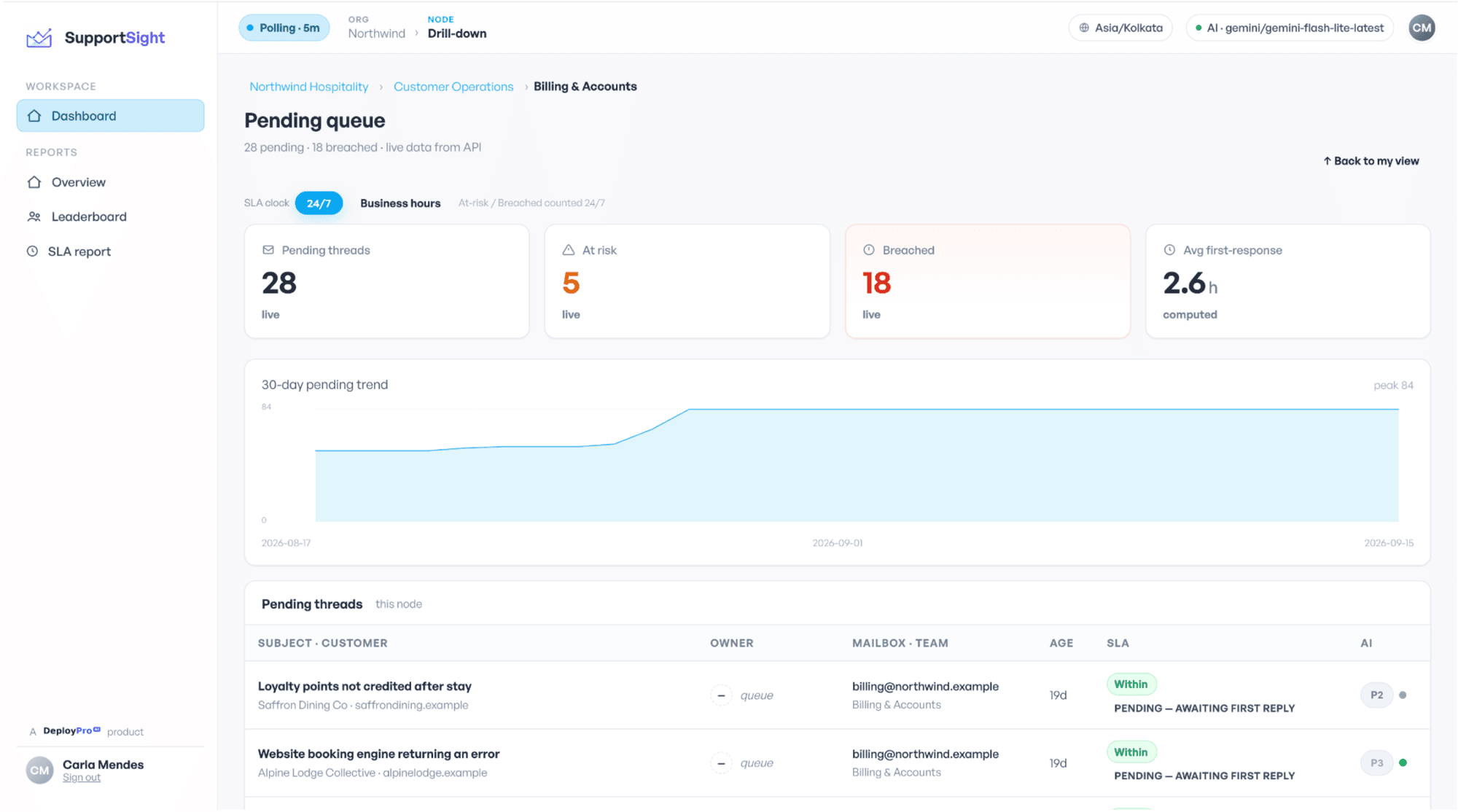
The pending queue: every thread still waiting, oldest first.
Two inboxes, one customer
Parts of the same conversation sit in shared and personal mailboxes. No one sees it end to end.
Arrived is not answered
Outlook shows the email. It doesn’t tell you who is responsible for replying.
Days of silent delay
Pending threads don’t show up anywhere. They sit for days before anyone notices.
Ownership by accident
In shared inboxes, everyone assumes someone else will reply. Managers end up checking threads one by one.
Customers who wait too long rarely escalate. They go quiet. The thread stays in a shared inbox while someone assumes it's handled, until it shows up later as an escalation or a lost relationship.
Thread facts
- Pending or answered
- Owner
- Time waiting
- Business-hours clock
AI reads
- Summary
- Category
- Priority
- Sentiment
Result
Reading the thread
Thread facts and the AI's reads, together, give you the threads at risk in order.
How it works
The clock says how long. The AI says how serious.
SupportSight brings every email thread together across Inbox and Sent Items, so you see the full conversation in one place. It shows which customers are still waiting, who is responsible, and how long each thread has been open on a business-hours clock. It prioritises threads based on urgency, sentiment, and customer context, so your team works on what matters first. It pulls in customer context from systems like Salesforce, so every thread is prioritised with the full picture.
- 1
Connect your mailboxes
Our team deploys SupportSight in your environment and connects the shared and personal mailboxes you choose.
- 2
Set business hours and reply targets
Per team, with holidays, so the clock measures real time to respond.
- 3
See what has been waiting
Every customer thread, who owns it, how long it has waited, and which ones are about to miss their target.
Deployed by our team, inside your environment.
What you'll see
Glimpses of the Product
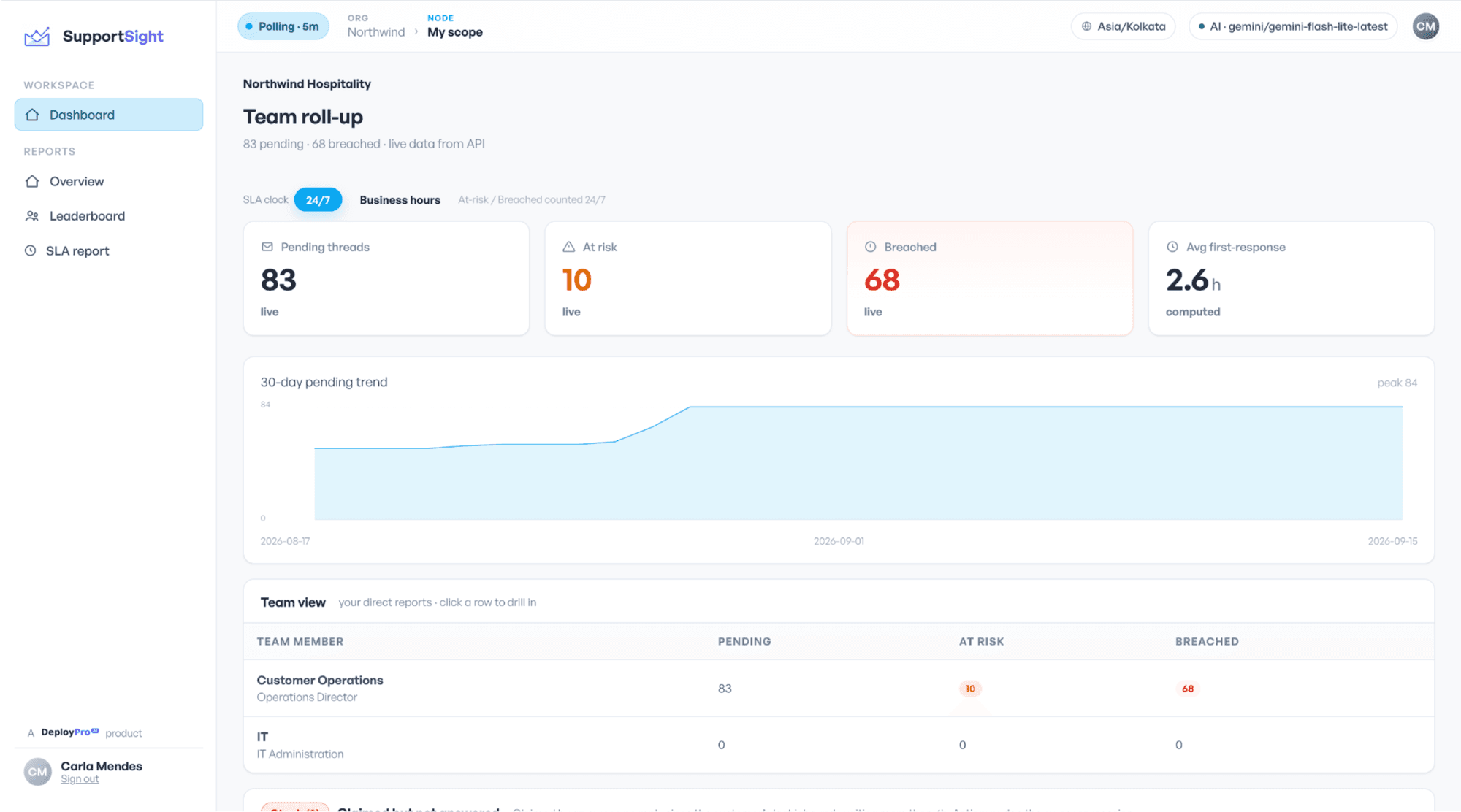
Main dashboard
Pending, at risk, and breached across every mailbox.
30-day trends with a full team roll-up.
 Hospitality accounting, UK
- Zerounseen emails
- 25+mailboxes
- 5Xmore consistent replies
Who it's for
Built for teams where the customer relationship runs on email
You will get the most from SupportSight if:
- Insurance sales and support
- Banks and NBFC customer service
- Account management and customer success
- Shared service desks
- Professional services
- Customer conversations live in mailboxes, shared and personal
- Your team works in Outlook and should keep doing so
- Managers need reply-time and ownership data across teams
- Your data cannot leave your environment
- A missed reply costs a renewal, a claim or a reference
Your email stays inside your environment
Deploys in your own cloud account or on-premise. The AI provider is pluggable, a hosted model or a fully local one, so nothing leaves your boundary. Raw email bodies are never stored; the system keeps metadata, the fields it works out and redacted summaries, with role-based access at every level and every action logged.
How it is priced
A one-time deployment in your environment, plus an annual licence banded by the number of mailboxes monitored. No per-message metering. Optional support tiers. Tell us the mailbox count and we will come back with a range within one working day.
Get started
See the queue on your own mailboxes
Tell us how many mailboxes and where they live. We deploy inside your environment and show you what has been waiting.
- Deployed inside your environment, nothing leaves your boundary
- No change to how your team works in Outlook
- See your own queue before you decide
FAQs
Frequently asked questions
A product that reads the shared and personal mailboxes you choose, inside your own environment, and shows every customer thread with an owner, its time waiting and its reply target. It runs alongside Outlook without changing how your team sends email.
Outlook and the Microsoft Graph store messages, not conversation state. SupportSight reconstructs the full conversation across Inbox and Sent Items and works out whether the last word was the customer’s or yours.
It processes them to work out ownership, urgency and a redacted summary, and does not store the body.
No. It deploys in your cloud account or on-premise.
Yes. Choose a local model and nothing leaves your boundary.
No. Your team keeps working in Outlook or Google Workspace. Ownership, deadlines and alerts sit alongside.
Yes. At Wenodo it covers more than twenty-five shared and personal mailboxes in one view, with each customer’s history visible across all of them.
A helpdesk turns email into tickets. SupportSight reads the email your team already sends and receives, and nothing becomes a ticket.
Our team deploys it in your environment and connects the mailboxes you choose. Tell us the mailbox count and where they live and we will scope it with you.
A one-time deployment plus an annual licence by mailbox band; ask us for a range.
Teams where the customer relationship runs on email: insurance sales and support, banks and NBFCs, account management, shared service desks and professional services.